
Polarr – Professional Online Photo Editor
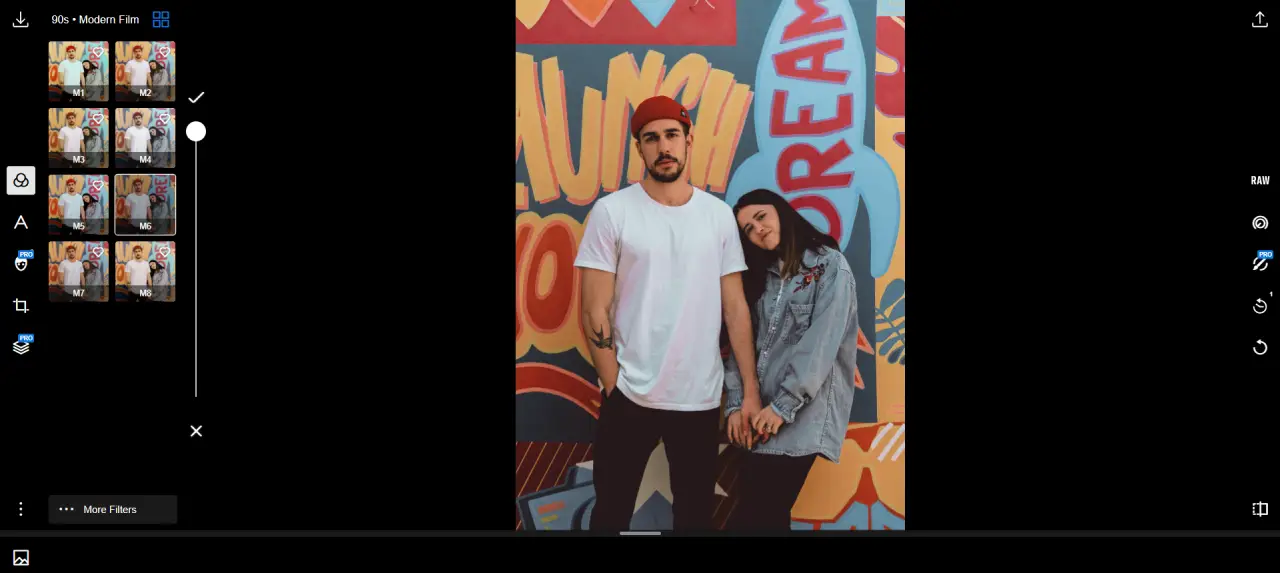
Polarr is a professional online photo editor designed for both beginners and advanced users. It offers powerful editing tools, customizable filters, and precise controls similar to desktop software.
With Polarr Online Photo Editor, you can enhance images, adjust colors, apply effects, and create stunning visuals—all without installing any app.
Editor Highlights
Key Features
Advanced Color Adjustments
Fine-tune temperature, tint, saturation, and color balance with precision tools.
Light & Exposure Controls
Adjust brightness, contrast, highlights, shadows, and exposure easily.
Professional Filters & Presets
Apply built-in filters or create your own custom presets.
Layer & Mask Support
Use masks and layers for selective editing and advanced compositions.
Retouch & Face Editing
Enhance portraits with skin smoothing, face adjustments, and retouch tools.
Export & Format Options
Export images in different formats with control over quality and size.
What Can You Do?
Enhance Photo Quality
Improve lighting, colors, and details for professional-looking images.
Create Social Media Content
Design eye-catching photos for Instagram, YouTube, and other platforms.
Apply Professional Filters
Use advanced presets to give your photos a unique style.
Edit Portraits
Retouch faces, adjust skin tone, and improve portrait images.
Who Is It For?
Photographers
Edit and enhance photos with precise control tools.
Content Creators
Create high-quality visuals for social media and branding.
Designers
Use filters, layers, and masks for creative projects.
Beginners
Easy-to-use interface with powerful features to learn editing.
Benefits
No Installation Needed
Use directly in your browser without downloading software.
Professional-Level Tools
Access advanced editing features similar to desktop apps.
Cross-Platform Support
Works on desktop, tablet, and mobile devices.
Flexible Editing Workflow
Customize your editing process with layers, masks, and presets.
How to Use Polarr
Open Polarr editor in your browser
Upload your image or start a new project
Adjust colors, lighting, and apply filters
Export your edited photo
Start Editing with Polarr
Open Polarr and create stunning photos with professional tools.
Launch Polarr Editor