
Remove Background
in Seconds
Upload any photo and get a perfectly cut-out image. Then swap backgrounds, apply effects, and download in full resolution.
Drag & drop your image here
JPG · PNG · WEBP · up to 25 MB
Or paste an image URL
Brush Mode
Brush Settings
Background Templates
Presets
Fine Tune
Quick Presets
Custom Size
Aspect Ratio
Drag handles on preview image
Add Padding
Drop your image here
JPG · PNG · WEBP · up to 25 MB
Or paste an image URL
Free Background Remover – Remove BG Online in Seconds
Remove backgrounds from any photo instantly. Our free background remover accurately cuts out people, products, animals, and objects in seconds — no manual selection, no design skills, no software required.
Download a clean transparent PNG every time. Perfect for product photos, profile pictures, social media posts, presentations, and eCommerce listings — completely free with no watermarks.
Works on any device — desktop, tablet, and mobile. Upload your image, remove the background, download the result instantly. No signup, no subscription, no cost.
100% free. No signup required. Background removal in under 5 seconds.

Background Remover Features
- Remove background in under 5 seconds
- Transparent PNG export — no watermark
- Manual brush for fine edge corrections
- 100+ background templates included
- Upload custom background images
- Works on portraits, products & objects
Background Remover — Fast, Free & Accurate
Our background remover uses advanced automatic detection to remove backgrounds from any photo with pixel-perfect accuracy. Whether you are removing backgrounds from portraits, product images, logos, or complex scenes, it works in seconds — no manual masking or Photoshop skills needed.
After bg removal, you can download a transparent PNG, add a solid color, choose a gradient, apply one of 100+ background templates, or upload your own custom background — all inside the same free tool.
Remove Background NowRemove Background — Instant & Accurate
Upload any photo and our background remover instantly detects the subject and removes the background with precision. No manual selection, no complicated settings — just upload and get a clean transparent result in seconds.
It accurately handles hair, fur, transparent objects, and complex edges that traditional tools struggle with. Get clean cut-outs every time, ready to download as a transparent PNG.
Remove Background Now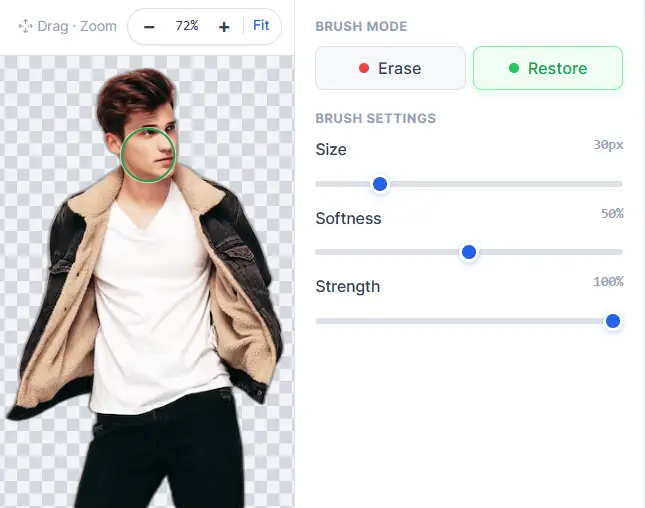
Fine-Tune Edges with the Manual Brush Tool
After background removal, use the manual Erase and Restore brush to perfect any edges that were missed. Adjust brush size, softness, and strength for precise pixel-level control.
Zoom in up to 12x for detailed corrections. Undo and redo any brush stroke. Get studio-quality cut-outs even for complex subjects like hair, fur, and translucent objects.
Try Manual BrushAdd Custom Backgrounds After BG Removal
Replace the removed background with any color, gradient, or image. Choose from 100+ professionally curated background templates — offices, cities, nature, beaches, space, abstract patterns, and more.
Upload your own background image or pick a solid color using the full color picker with HEX, RGB, and HSL support. Export the final composite as a high-quality PNG with one click.
Add Background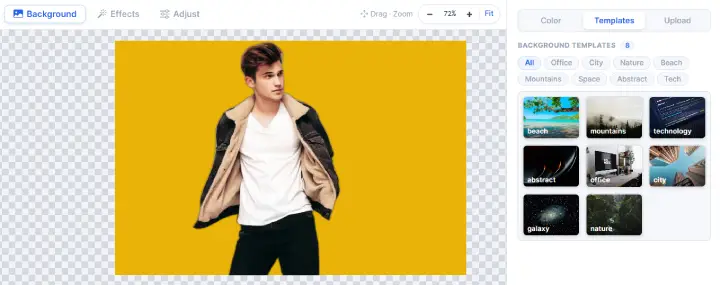
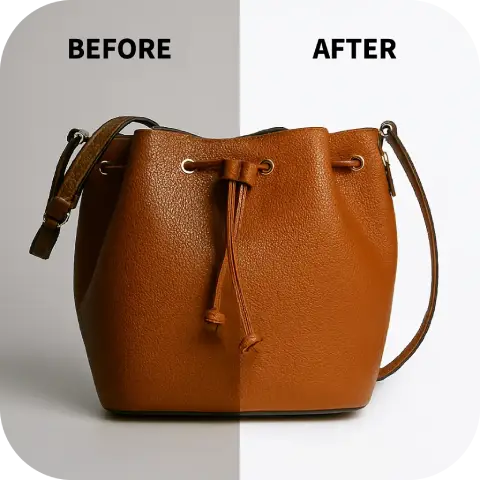
Perfect for Product Photography & eCommerce
Remove backgrounds from product images to create clean white or transparent backgrounds for Amazon, Shopify, Etsy, and other eCommerce platforms. Meet marketplace image requirements with consistent, professional results.
Process product photos from any angle and lighting condition. The tool handles reflections, shadows, and complex product shapes — no photography studio or Photoshop expertise needed.
Remove Product BGRemove Background from Portraits & Profile Photos
Get perfectly cut-out portraits for LinkedIn profile pictures, ID photos, HR documentation, and social media avatars. It precisely handles hair, loose strands, and skin tones for natural-looking results.
Replace portrait backgrounds with professional office settings, solid colors for official documents, or branded backgrounds for consistent social media presence — all in seconds.
Remove Portrait BG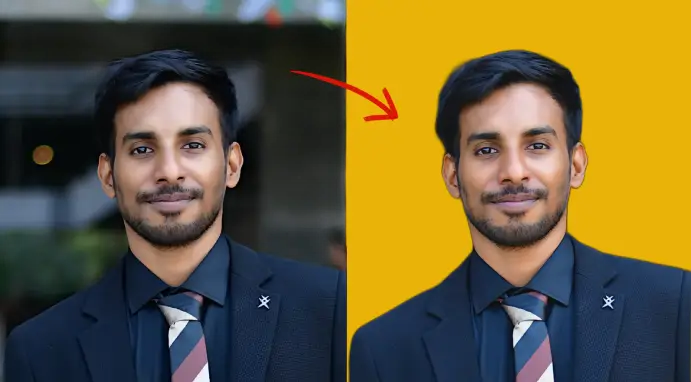
Free BG Remover — Works on Any Device
Our free bg remover works directly in your browser — no download, no installation, and no app required. Works on Windows, Mac, Linux, Chromebook, iPhone, and Android devices.
Your images are processed securely — nothing is stored on our servers. Download your transparent PNG instantly after background removal, completely free and without watermarks.
Try Free on Your DeviceHigh quality cutouts
See how our background remover handles every type of image — from products to people.
How to Remove Background Online in 3 Steps
Fast, free, and automatic — bg removal in seconds with no design skills needed.
01. Upload Your Image
Drag & drop, browse your files, or paste an image URL. Supports JPG, PNG, WEBP, and images up to 25 MB.
02. Background Removed Automatically
The tool instantly detects the subject and removes the background with precision. Fine-tune edges with the manual brush if needed.
03. Download Transparent PNG
Download your cut-out as a high-resolution transparent PNG — completely free, no watermark, no account required.
Free Background Remover — Full Feature Set
Everything you need to remove bg, replace backgrounds, and perfect cut-outs — all free, all in one tool.
Automatic Background Removal
Smart automatic detection removes backgrounds from any photo in seconds. Accurately handles hair, fur, complex edges, and transparent objects.
100+ Background Templates
Instantly replace removed backgrounds with professionally curated scenes — offices, cities, beaches, mountains, space, abstract, bokeh, and more.
Manual Erase & Restore Brush
Pixel-perfect brush tool to correct any edges missed during bg removal. Adjustable size, softness, and strength with full undo/redo support.
Portrait & People Cut-Outs
Precisely remove backgrounds from portraits including fine hair strands. Perfect for LinkedIn photos, ID images, HR documentation, and social media avatars.
Product Photo BG Removal
Create clean white or transparent backgrounds for eCommerce product photos on Amazon, Shopify, Etsy, and other marketplace platforms.
Works on Any Device
Runs entirely in your browser — no download required. Works on Windows, Mac, Chromebook, iPhone, iPad, and Android.
Custom Color & Gradient Backgrounds
Replace removed backgrounds with any solid color using the full color picker (HEX, RGB, HSL) or choose from beautiful gradient presets.
Results in Under 5 Seconds
Background removal completes in under 5 seconds. No queues, no waiting, no server delays. Instant results for any image.
Transparent PNG Export
Download clean transparent PNG files with no watermark, no compression, and no quality loss — completely free every time.
100% Private & Secure
Your images are processed and never stored on our servers. Complete privacy guaranteed. Nothing is saved, shared, or used for any purpose.
Resize, Crop & Expand Canvas
After removing the background, resize to exact dimensions, crop to any ratio, or expand the canvas with padding — all inside the same tool.
Free — No Subscription
Completely free background removal with no hidden costs, no credit card, no account needed, and no watermarks on downloaded images.
Free Background Remover vs Paid Tools
See how PhotoTul bg remover compares to popular paid alternatives like remove.bg.
| FEATURE | PhotoTul BG Remover FREE | Paid Tools (remove.bg etc.) |
|---|---|---|
| Price | Free | $9–$24/month |
| Account required | No | Yes |
| Watermark on download | No | Yes (free tier) |
| Auto background removal | Yes | Yes |
| Manual brush correction | Yes | Limited |
| Background templates 100+ | Yes | No |
| Custom BG upload | Yes | Yes |
| Resize & crop tools | Yes | No |
| Transparent PNG export | Yes | Yes |
| Image privacy | Yes | Varies |
Remove Background Online — Free, Fast & No Signup
Our free background remover is the fastest way to remove bg from any image online. Whether you need to remove background from product photos for eCommerce, cut out portrait backgrounds for LinkedIn or ID cards, or prepare transparent PNG images for design projects, it works automatically in seconds. No Photoshop, no design skills, no payment required.
Used by photographers, eCommerce sellers, marketers, students, and social media creators worldwide. The free bg removal tool works on any image — portraits, products, logos, animals, and complex scenes. Download high-resolution transparent PNG files instantly, every time, completely free.
Why Use PhotoTul Background Remover?
The fastest, most accurate free bg remover — no signup, no watermark, no limits.
Precise Auto Detection
Smart automatic detection removes backgrounds with precision — including hair, fur, and complex edges other tools miss.
Truly Free
No subscription, no credit card, no watermarks. Full-resolution transparent PNG downloads are always free.
Results in Seconds
Background removal completes in under 5 seconds. No queues, no waiting — instant results every time.
100% Private
Your images are never stored or shared. All processing is secure and your photos remain completely private.
Frequently Asked Questions — Background Remover
Yes, our background remover is completely free. There are no hidden fees, no subscription, no account required, and no watermarks on downloaded images.
The tool uses automatic subject detection to identify people, products, animals, or objects in your image and separates them from the background with pixel-level precision. It processes images in under 5 seconds.
You can upload JPG, PNG, and WEBP images up to 25 MB. The result is always downloaded as a high-quality transparent PNG file.
Yes. The background remover is optimized for portraits and people, including accurate detection of hair strands, loose flyaways, and skin tone edges for natural-looking cut-outs.
Absolutely. Our bg remover is widely used for product photography — creating clean white or transparent backgrounds for Amazon, Shopify, Etsy, eBay, and other eCommerce platforms.
After bg removal, you can download the transparent PNG immediately, or use the built-in tools to add a new background — solid color, gradient, or one of 100+ background photo templates.
Yes. Use the manual Erase and Restore brush tool to fix any edges missed. Adjust brush size, softness, and strength. Full undo/redo support is included.
Your privacy is our priority. Images are processed securely and are never stored, shared, or used for any purpose. Nothing is saved on our servers after your session ends.
Yes. Our bg remover runs entirely in your browser and works on iPhone, iPad, Android devices, Chromebooks, and all desktop operating systems — no app download required.
Unlike remove.bg, PhotoTul background remover is completely free with no watermarks on full-resolution downloads, includes a manual brush correction tool, offers 100+ background templates, and requires no account or credit card.
Remove Background from Any Image — Free, Instant, No Signup
Remove bg in seconds. Download transparent PNG free. No account needed.
Remove Background Free