
Online RAW Image Converter & Viewer
View, Edit & Convert RAW Photos (CR2, NEF, ARW, DNG) Instantly
Raw.pics.io is a powerful online RAW image viewer and converter that lets you open, view, edit, and convert DSLR RAW files directly in your browser. It supports popular RAW formats like CR2 (Canon), NEF (Nikon), ARW (Sony), ORF (Olympus), PEF (Pentax), RAF (Fujifilm), and DNG.
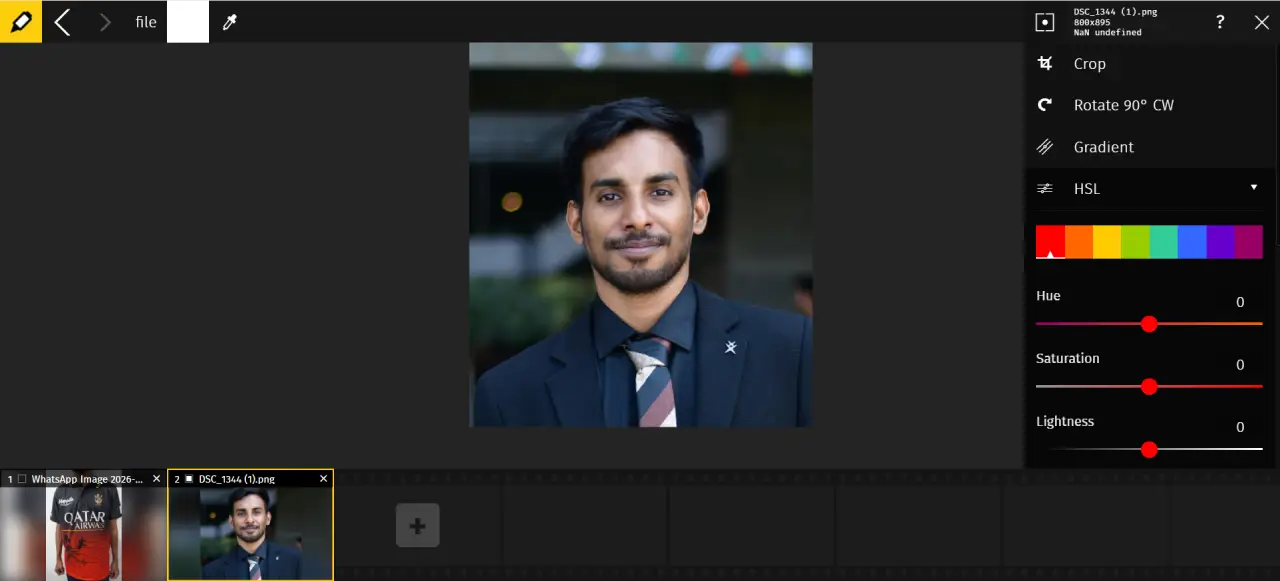
Unlike heavy photo editing software, Raw.pics.io works entirely in-browser, ensuring fast performance and complete privacy. You can convert RAW images to JPG, PNG, or TIFF, adjust exposure, crop photos, and even view EXIF metadata—all without installing any software.
Key Highlights
Core Features
RAW Image Viewer
Open and view RAW image files instantly without specialized software.
Advanced RAW Converter
Convert RAW images to JPG, PNG, or TIFF formats for easy sharing and printing.
Basic Photo Editing Tools
Crop, rotate, flip, and adjust brightness, contrast, exposure, sharpness, and white balance.
Batch Processing
Convert multiple RAW files at once to save time and boost productivity.
EXIF Metadata Viewer
View camera settings, date, time, and other metadata embedded in RAW images.
Cloud & Local Support
Upload images from local storage, cloud services, or directly from your device.
Why Use Raw.pics.io?
No Software Needed
Work with RAW files directly in your browser without installing Lightroom or Photoshop.
Wide Camera Support
Compatible with RAW formats from Canon, Nikon, Sony, Olympus, Pentax, and Fujifilm cameras.
Fast & Lightweight
Quickly load, preview, and convert images without slowing down your device.
Privacy First
Your images stay on your device with secure in-browser processing.
Popular Use Cases
Professional Photography Workflow
Quickly preview and convert RAW files before detailed editing in advanced software.
RAW to JPG Conversion
Convert RAW images into web-friendly formats for websites and social media.
Quick Image Editing
Make basic adjustments like cropping, brightness, and color correction online.
Metadata Analysis
Check EXIF data to understand camera settings and improve future shots.
Who Should Use It?
Photographers
View and convert RAW files without heavy desktop software.
Content Creators
Prepare high-quality images for blogs, YouTube, and social media.
Designers
Convert RAW images into usable formats for design projects.
Students & Beginners
Learn RAW image editing with an easy-to-use interface.

Key Benefits
Save Time
Instantly open and convert RAW images without lengthy uploads.
Free to Start
Use basic RAW viewing and conversion features without registration.
Easy to Use
Clean interface suitable for beginners and professionals alike.
Cross-Platform
Works on Windows, Mac, Linux, and mobile browsers.
How to Use Raw.pics.io
Open Raw.pics.io in your web browser
Upload or drag and drop your RAW image files
Preview and edit the image if needed
Select output format (JPG, PNG, or TIFF)
Download the converted image instantly
Convert RAW Images Instantly
Use Raw.pics.io to view, edit, and convert RAW photos online quickly and securely.
Open Raw.pics.io Now